UPDATED DECEMBER 2025 FOR ACCURACY
Would you rather SEE a step-by-step video? We got you!
Trust us, we’ve been through this process more times than we can count and Passports ‘N Paradise, and other travel professionals, are constantly answering the same questions about it so we know exactly where people get stuck with the Dominican Republic E-ticket. Whether you’re planning your first trip to the Dominican Republic or you’re a repeat visitor who needs a refresher (some rules have changed), in this article and related video, we’re going to walk you through everything you need to know to get it done right the first time.
What Exactly Is the Dominican Republic E-Ticket?
The e-Ticket is a digital form required by multiple institutions to enter or leave the national territory. It is mandatory for each passenger to truthfully complete the information in the electronic ticket for the General Directorate of Migration and the General Directorate of Customs, according to Dominican laws 285-04, 115-17, 72-02 and 226-06. You will also need to complete another when you leave the country.
The best part? There is no cost associated with obtaining the electronic ticket for entry and exit from the Dominican Republic. It’s completely free.
NOTE – some countries DO require a Dominican tourist visa in addition to the e-Ticket. This article is written for those countries that DO NOT REQUIRE ONE as of December 2025 which include visitors from the United States, Canada, United Kingdom, the European Union, Russia, Ukraine, Kazakhstan, Mexico, many South American countries, Central America, Japan, Israel, and others. If your country is not in this list, please check the Dominican government website for more information.
Common Misconceptions or Misinformation about the E-Ticket
You may see information on the web (or advice from forums) that mentions a tourist card and additional required forms. All that has been replaced by the e-Ticket system. Here’s how it used to work.
- The tourist card used to cost $10 USD and travelers had to purchase a physical card
- Travelers had to complete three separate paper forms: International Boarding and Disembarkation Card, Customs Declaration Form, and Traveler’s Health Affidavit
- You’d typically buy the tourist card either before departure or at a booth in the airport upon arrival, paying cash
- A few years ago (pre-COVID), the Dominican government mandated that the cost of the entry tourist card must be included in the airfare by every arriving airline.
- There was a time when you had to complete the e-Ticket within 72 hours of your flight. This is no longer the case. It can be filled out as soon as you have your flight information, even months in advance. However, it MUST be filled out before arriving at the counter at your departing airport, as it is required to present it to the airline. Most airlines will ask you to upload it along with your passport as part of your pre-flight preparation.
- It is NOT a criminal offense to overstay the 30 day automatic visa—there’s no ban on re-entry and no criminal penalty. If you know how long you plan to overstay, you can pay this directly to the Dominican immigration office up front OR you can pay it at the airport when you leave. There is no difference in the amount you pay so most visitors choose to pay at the airport upon departure.
Here’s how it works NOW:
- This online e-Ticket form replaces the three forms currently required—now all this information is in one place
- The e-Ticket isn’t a substitute for the tourist card, but since the tourist card nowadays is included in all flight tickets to the Dominican Republic, you don’t have to worry about it—your airline has taken care of it.
- No costs are involved when filling out the immigration form. If you are getting asked for credit card details, you landed on a scam website
When Should You Fill Out Your E-Ticket?
As previously mentioned, it is NO LONGER REQUIRED TO FILL IT OUT 72 HOURS PRIOR TO THE TRIP. It can be filled out as soon as you have your flight information but to be on the safe side, the form should be completed at LEAST 72 hours before your arrival to avoid any last-minute issues.
If you’re traveling as a family, here’s some good news. While you must fill out the form with the data of all the family members who will be traveling, it is only necessary that a single user be created in the system and that this user fill in the data of all the members of the family that belong to that trip, up to 6 members in addition to the one filling out the form (7 persons in total per form).
Step-by-Step Guide to Filling Out Your E-Ticket
IMPORTANT NOTES:
- While Dominican immigration via the e-Ticket does not require you to specify a departure flight, it does require you to specify a departure date. If you are unsure of your return date, just guesstimate to the best of your ability. It is best to be honest even if you plan to stay, as a tourist, beyond the 30 day automatic tourist visa.
- Some airlines or countries of origin MAY require you to specify a return flight. If you are not yet sure when you will return home, some folks have met the requirements by booking a refundable flight and canceling it after they arrive in the Dominican Republic.
Step 1: Gather the information you will need
- Passport number
- Flight number
- Flight confirmation number
- Departing airport
- Arrival airport
- Address of where you will stay in the Dominican Republic (ask your host for province and district)
Step 2: Access the Official Website
You might be prompted to complete the Dominican e-Ticket as required by your airline and, if so, they will likely provide you with the link to the official site.
If not, you can go directly to the official government portal here: https://e-Ticket.migracion.gob.do/
Make sure you’re on the right site – it should have the Dominican government seal and the .gob.do domain. I can’t stress this enough because there are some sketchy copycat sites out there.
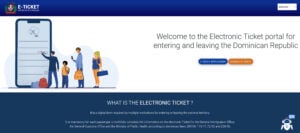
Step 3: Choose Your Language and Start the Form
- Click on the language dropdown in the top right corner to switch to English and then click on “E-Ticket Application” to access:
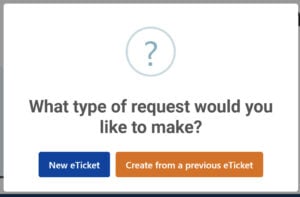
- Select “New e-Ticket” to access the following:

- Indicate if you will be travelling with others and complete the displayed fields.
- Click the box to indicate you are not a robot.
- Click submit to display the application questions.
Step 4: Complete the Application
Page 1 – Origin Information
- This is pretty straightforward, but here are the fields you’ll need to complete:
- Permanent address
- Country of residence
- City
- State
- Zip
- Will you make other stops before arriving in the Dominican Republic (Yes or No)
- Indicate whether this is an arrival e-Ticket or departure e-Ticket.
- Click Next
Page 2 – Personal Information
- Complete the displayed fields as follows:
- First Name (exactly as it appears on your passport)
- Last Name (exactly as it appears on your passport)
- Date of birth
- Gender
- Place of Birth
- Is Passport nationality different than place of birth?
- Passport number
Pro tip: Double-check every single character of your passport number – one wrong digit and you’ll have problems at the airport.
-
- Civil status (marital status)
- Occupation
- Phone number
- Are you a foreign resident of the Dominican Republic?
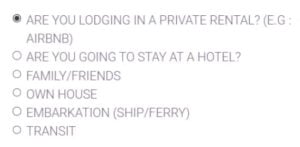
- Select the checkbox for where you are staying.
-
- Ener the Address including province, municipality, section
Pro Tip: If you are staying at a vacation rental, please ask the host to provide the complete address, including province, municipality and sector. Don’t just put “Hotel X” – you need the full address. If you’re staying in Bávaro, make sure you have the complete address including the sector information.
-
- Street and number
- Embarkation port
- Disembarkation port
- Airline
- Flight date
- Flight number
- Flight confirmation number
- Travel purpose
- Days of staying
- Do you plan on practicing the following sports during your stay?
- Click Next.
Page 3 – Customs Information
Answer the questions and declare any items you’re bringing that might be subject to customs duties. For example, you would answer Yes to the 2nd question if bringing your pet with you.
Page 4 – Did anyone assist you?
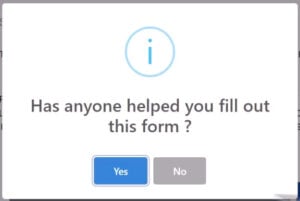
- Click Yes or No.
Page 5 – Accept Terms and Declare Accuracy
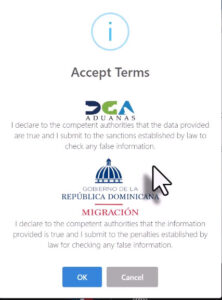
- Click OK.
Page 6 – Optionally Complete Exit Ticket
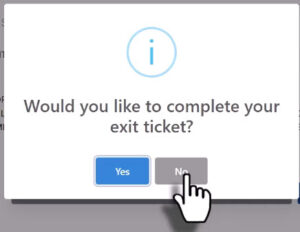
- Select Yes or No.
Pro tip: Just in case you choose to extend or shorten your stay, you can opt to wait and do this just before your actual departure.
Getting Your QR Code
After successful submission, you’ll receive a QR code. Save or screenshot the QR code and you may want a printed copy as well. You may be required to show this QR code at airline check-in and again to immigration when you arrive in the Dominican Republic.
A single QR code will be generated for the family if you’re traveling together. You can print or make a screenshot of the arrival and departure confirmation QR codes.
Pro Tip: From Dawn with Passports in Paradise: “I’ve been having people also email it to themselves because a few of the budget airlines will not take just the QR code, they want to see the WHOLE thing.”
Family Travel Made Easy
If you’re traveling with family, the process is much simpler than you might think. Families can streamline the e-Ticket process by completing a single form for up to seven members, simplifying travel logistics. A single QR code will be generated for the family if you’re traveling together.
At the beginning of the form, you must specify the number of additional family members you are traveling with. For example, if a family of 4 people is traveling, you must add only 3 people and the platform will assume that there are 4 passengers in total: the user who is filling out the form, plus the additional 3.
If more than 7 people are traveling, you must fill out an additional form for the rest.
Common Problems and How to Fix Them
Even with a trusted guide like nowinpuntacana.com, sometimes problems arise. Here’s what we’ve learned.
The “Required Fields” Error
This is the most common problem. I also had problems with the website and got this same message “AN ERROR HAS OCCURRED WHILE SENDING THE FORM, PLEASE FILL OUT ALL REQUIRED FIELDS” What you can try is to re-enter all info – delete each field completely and enter the info again, even if it is correct.
Browser and Device Issues
Technical issues with the e-Ticket form can often be resolved by trying different devices or web browsers. If the form fails to accept input, refreshing the page or switching languages might fix the glitch.
We recommend using Chrome or Firefox, and avoid doing this on your phone if possible. The desktop version tends to work more reliably.
Date Entry Problems
Some travelers have issues with the date fields, especially if they’re arriving via a connecting flight. Make sure you’re entering your actual arrival date in the Dominican Republic, not your departure date from your home country.
What If You Forget to Fill It Out?
Don’t panic. You can fill it out when you enter the airport. Airports will have free wireless internet available to fill out the form using any electronic device with wireless internet access capability.
However, this can cause delays and stress, especially if the wifi is slow or if there are technical issues. We always recommend doing it ahead of time.
Making Changes to Your E-Ticket
If you need to make any changes to the E-TICKET, you can consult it with the application code that was issued when you started filling out the form and make changes.
Keep that application code safe! Screenshot it, write it down, or save it in your email. You’ll need it if you have to make any modifications.
Do You Need This for Departure Too?
Yes, you’ll need to fill out a separate E-ticket for your departure. Each trip is a new request. You can complete both arrival and departure forms in one sitting to avoid filling it out later during your trip.
Special Situations
Private Flights and Boats
Passengers arriving on private flights, non-commercial vessels, ferries, cruise ships, etc., do not need to fill out the E-TICKET. The physical Customs Declaration and International Embarkation/Disembarkation forms will be accepted for the aforementioned passengers.
Connecting Flights
If you’re connecting through another country, you’ll still need to fill out the E-ticket for your final arrival in the Dominican Republic. The form asks about connecting flights, so make sure you indicate this correctly.
Final Tips from Those Who’ve Been There
After filling out dozens of these forms over the years, here are our top recommendations:
- Do it early – Don’t wait until the last minute
- Gather all required info before you begin
- Double-check everything – One wrong digit in your passport number will cause problems
- Save everything – Screenshot your QR code and save your application number
- Keep it accessible – Have your QR code easily available on your phone and consider printing a backup
- Be patient – The website can be slow, especially during peak travel times
The Dominican Republic E-ticket system has definitely made travel easier once you understand how it works. Yes, it can be a bit intimidating, but it beats filling out those paper forms on a bumpy airplane.
Take your time, follow these steps, and you’ll be all set for your trip to this beautiful country. And once you’re here in Punta Cana, you’ll forget all about the minor hassle of filling out the form when you’re enjoying those crystal-clear waters and perfect beaches.